Ansible
- Ansible 简介
- Ansible Inventory
- Ansible 配置文件
- Ad-hoc与命令执行模块
- Ad-hoc 常用模块
- Playbook 基本使用使用
- Playbook 结构及handler用法
- 自定义变量
- Fact
- 魔法变量
- 使用lookup生成变量
- 使用vault配置加密
- lineinfile模块
- Playbook循环语句
- Playbook条件语句
- 文件管理模块及Jinja2过滤器
- Playbook高级用法
- Playbook tags
What is Ansible
Ansible is an automation and configuration management technology used to provision, deploy, and manage compute infrastructure across cloud, virtual, and physical environments.
Feature
- Agentless: 被控端只需要运行sshd,不需要额外安装客户端
- Serverless: 主控端无需启动任何服务
- SSH by default: 默认使用ssh控制节点
- YAML: 使用YAML语言定制playbook
- Modules in any language: 基于模块工作
- Strong multi-tier solution: 可多级控制
基本组件
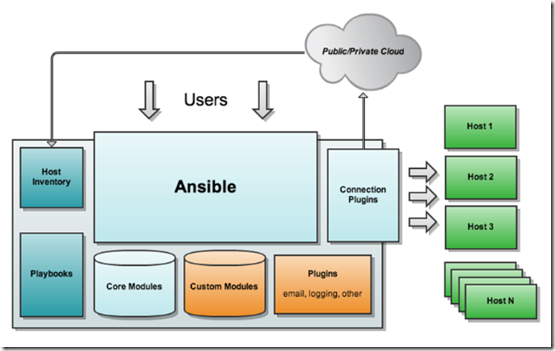
- 核心: ansible
- 核心模块(Core Modules): ansible自带模块
- 扩展模块(Custom Modules):
- 插件(Plugins): 模块功能补充
- Playbooks:
- 连接插件(Connection Plugins): ansible基于Connection Plugins连接到各个主机. 默认使用ssh连接方式,同时也支持其他连接方式.
- 主机群(Host Inventory):
工作机制
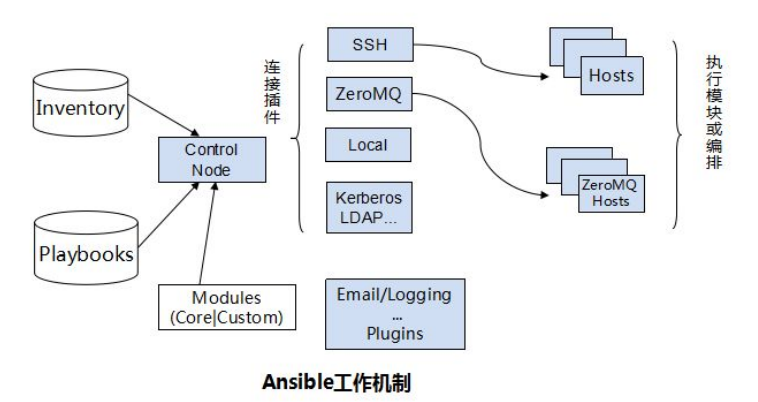
Ansible works by pushing ansible modules to the target hosts via ssh protocol (or other methods such as kerberos, LDAP), and deleting them after execution. Custom modules and playbooks can be managed using version control systems.
安装及配置
dnf install ansible -y
配置文件优先级
- 变量 ANSIBLE_CONFIG
- 当前工作目录下的 ./ansible.cfg文件
- 当前用户家目录下的 ~/.ansible.cfg文件
- 系统默认 /etc/ansible/ansible.cfg文件
配置文件字段
- [defaults] : 通用配置
- [inventory] : 与主机清单相关的配置
- [privilege_escalation] : 特权相关的配置
- [paramiko_connection] : paramiko是RHEL6及之前的版本中默认使用的ssh连接方式
- [ssh_connection] : openssh连接的相关配置, openssh是RHEL6之后的ansible默认的ssh连接方式
- [persistent_connetion] : 持久连接的配置项
- [accelerate] : 加速模式配置项
- [selinux] : selinux相关的配置项
- [colors] : ansible命令输出的颜色相关的配置项
- [diff] : 定义运行时打印diff(变更前后差异)
Ansible Inventory
介绍
批量管理主机的时候, 需要预先定义主机或者组, 这个文件叫 Inventory, 默认位于 /etc/ansible/hosts.
/etc/ansible/hosts 文件的格式如下:
mail.example.com

[web]
web[1:5].example.com

[db]
db[1:3].example.com

[prod:children]
web
db
-
指定主机 mail.example.com
-
指定主机组 web, db
-
主机组嵌套 prod
未被分组的主机默认在ungrouped组内
选择主机和组
举例主机清单
srv1.example.com
srv2.example.com
s1.lab.example.com
s2.lab.example.com

[web]
jupiter.lab.example.com
saturn.example.com

[db]
db1.example.com
db2.example.com
db3.example.com
#db[1:3].example.com

[lb]
lb1.lab.example.com
lb2.lab.example.com

[boston]
db1.example.com
jupiter.lab.example.com
lb2.lab.example.com

[london]
db2.example.com
db3.example.com
file1.lab.example.com
lb1.lab.example.com

[dev]
web1.lab.example.com
db3.example.com

[stage]
file2.example.com
db2.example.com

[prod]
lb2.lab.example.com
db1.example.com
jupiter.lab.example.com

[function:children]
web
db
lb
city

[city:children]
boston
london
environments

[environments:children]
dev
stage
prod
new

[new]
172.25.252.23
172.25.252.44
匹配所有主机
ansible all --list-hosts
匹配指定的主机或主机组
匹配单个主机
ansible db1.example.com --list-hosts
匹配多个主机
ansible 'db1.example.com,s1.lab.example.com' --list-hosts
匹配单个组
ansible prod --list-hosts
匹配多个组
ansbile 'london,boston' --list-hosts
匹配不属于任何组的主机
ansible ungrouped --list-hosts
通配符匹配
-
匹配 *.example.com
ansible '*.example.com' --list-hosts -
匹配以
s开头的主机或主机组ansible 's*' --list-hosts
通配符组合匹配
-
匹配包含
*.example.com但不包含*.lab.exampl.ecom的主机或主机组ansible '*.example.com,!*.lab.example.com' --list-hosts -
匹配属于db组同时属于london组的主机
ansible 'db,&london' --list-hosts -
匹配在london组或者boston组, 同时在prod组 但不在lb组中的主机
ansible 'london,boston,&prod,!lb' --list-hosts
正则表达式匹配
~ 用来表明这是一个正则表达式匹配
ansible '~(s|db).*example\.com' --list-hosts
通过 --limit 明确指定主机或组
ansible ungrouped --limit srv1.example.com --list-hosts-
ansible ungrouped --limit @retry_hosts.txt --list-hostsretry_hosts.txt里预先定义内容